



Have you ever wanted to add some flair to your WhatsApp messages? Maybe you want to emphasize a word or make a sentence look extra special. Well, guess what? You can do all that and more right on WhatsApp! Today, we’re going to learn how to do text formatting like bold, italic, and underline in WhatsApp. It’s like having a mini word processor right in your chat app!
Why Use Text Formatting in WhatsApp?
Let’s talk about the reasons why you might want to use text formatting in your WhatsApp messages. Here are a few reasons:
1. Emphasis: When you want to stress a particular word or phrase, formatting can help it stand out.
2. Clarity: Formatting can make your messages easier to read and understand.
3. Fun: It’s just fun to play around with different styles in your chats!
4. Organization: You can use formatting to create headings or lists in longer messages.
Now that we know why it’s cool, let’s learn how to do it!
Text formatting in WhatsApp is a cool way to add some spice to your messages. Whether you’re planning a surprise party, sharing an important announcement, or just want to add some flair to your chats, these tricks will come in handy. So, let’s discover how to make your WhatsApp messages stand out!
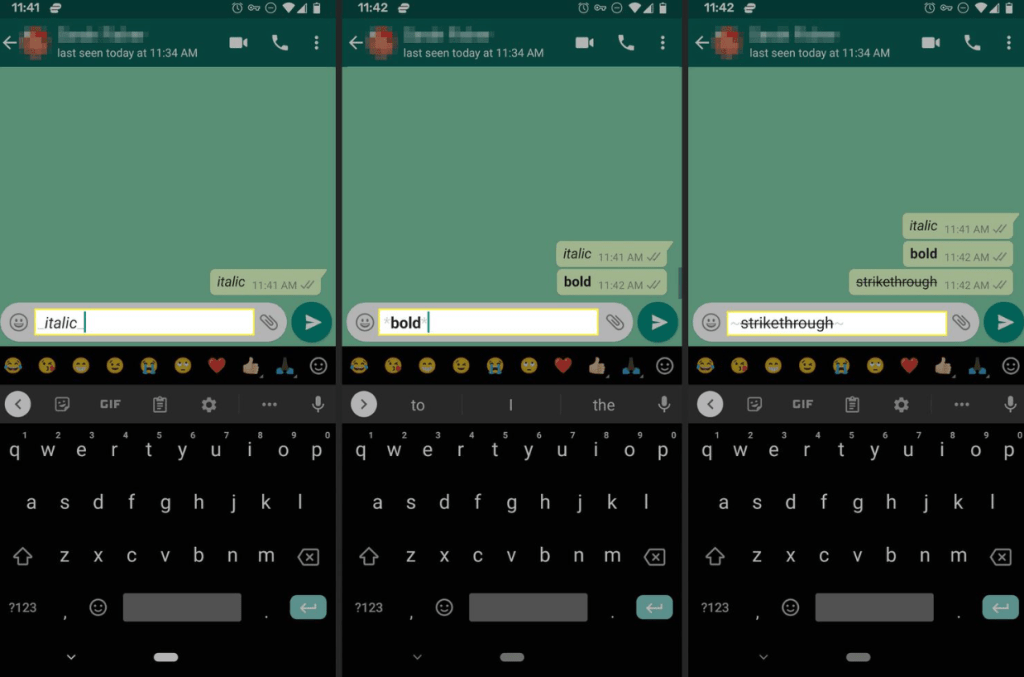
How to Make Text Bold in WhatsApp
Making text bold is a great way to make important words or phrases stand out. It’s perfect for emphasizing key points or drawing attention to specific information. Here’s how you do it:
1. Open WhatsApp and go to any chat.
2. Type an asterisk (*) before and after the text you want to make bold.
3. For example, typing *hello* will make the word hello bold.
That’s it! When you send the message, the asterisks will disappear, and your text will appear in bold! This simple trick can really make your messages pop and ensure important information doesn’t get overlooked.
How to Make Text Italic in WhatsApp
Italic text can add a touch of style or emphasis to your messages. It’s great for quotes, book titles, or adding a subtle highlight. Here’s how to do it:
1. In your WhatsApp chat, type an underscore (_) before and after the text you want to make italic.
2. For example: typing _hello_ will make the word hello italic.
Send the message, and that’s it! Your text will appear in italics. It’s a great way to add some variety to your text formatting and make certain words stand out in a more subtle way than bold text.
How to Strikethrough Text in WhatsApp
Strikethrough is a fun way to show that something has changed or been canceled. It’s also useful for showing corrections or updates in a message. Here’s how:
1. In your WhatsApp message, type a tilde (~) before and after the text you want to strikethrough.
2. For example, typing ~hello~ will make the word hello strikethrough.
When you send it, the text will appear with a line through it. This can be particularly useful in group chats when plans change or in one-on-one conversations to playfully retract something you’ve said.
How to Monospace Text in WhatsApp
The monospace text makes each letter take up the same amount of space. It’s great for coding, creating neat lists, or just giving your text a different look. Here’s how:
1. Type three backticks (“`) before and after your text.
2. For example, typing hello“` will make the word hello monospace.
This will make your text appear in a monospace font. It’s a less common formatting option, but it can be very useful for certain types of information or for creating a distinctive look in your messages.
Third-party apps and WhatsApp Mods for Advanced Formatting
Want more formatting options? Third-party apps like GBWhatsApp offer additional features.
GB WhatsApp allows you to customize your messages with different fonts, colors, and styles. Here’s how:
1. Download and install GBWhatsApp from gbwhatsroid.com
2. Open GBWhatsApp and go to Settings
3. Tap “Fonts” and “Colors” to explore options
However, while this might sound exciting, it’s important to remember that these apps aren’t official and can be risky to use. Always use trusted sources to download third-party apps, and be cautious when using them.

Tips for Using Text Formatting
Here are some tips to help you make the most of text formatting in WhatsApp:
- Don’t overdo it: Using too much formatting can make your messages hard to read. Use it sparingly for the best effect.
- Practice makes perfect: Try out different combinations in a chat with yourself to get the hang of it.
- Use it for important info: Formatting is great for highlighting key information in long messages.
- Get creative: Use formatting to create fun patterns or designs in your messages.
- Remember the symbols: Keep a note of the symbols for each format until you remember them by heart.
As WhatsApp continues to evolve, who knows what new formatting options we might see in the future? For now, have fun playing with bold, italic, strikethrough, and monospace text. Your WhatsApp chats are about to get a whole lot more interesting!
Conclusion
Text formatting in WhatsApp is a great way to make your messages more engaging and easier to read. By using simple symbols, you can make your text bold, italic, strikethrough, or even monospace. While WhatsApp doesn’t support underlining text, you can still make your messages stand out with the available formatting options.
If you need more features, third-party apps like GB WhatsApp can offer additional formatting options, but use them with caution. Now, go ahead and format your way!
25 thoughts on “How to Do Text Formatting Like Bold, Italic, and Underline in WhatsApp?”
This blog is really informative, I finally understand the topic better. You should also try Pagalworld. Thanks for sharing such clear details!
Cool article! I’m really intrigued by the TeaSpill concept. It’s kind of genius—finally a place where women can protect each other with real stories, not just vague warnings in group chats. https://teaspill.site/
Excellent write-up! AI tattoos are perfect for inspiration. I wouldn’t skip the human touch, but it’s an amazing starting point.
“SSSTikTok is a lifesaver when you want to save TikToks and repost them. Super fast and easy to use.”
Been using this Telegram MOD for a week now—zero regrets. The best part? You can hide your online status without sacrificing functionality. That alone makes it better than the official version for me.
As a creator, researching topics takes forever. A YouTube video summary AI helps me quickly grasp competitor videos’ key ideas without watching them fully. Super useful for scripting and trend analysis!
Remember when we all obsessed over Incredibox in school? Sprunki Game remix brought back that nostalgia but with even wackier beats. Perfect for killing time or sparking creativity. Highly recommend giving it a spin!
Official WhatsApp is too restrictive. GB WhatsApp latest version download unlocks features like sending 90MB files, 4K status videos, and 1,000+ emojis. Works without root—just backup chats before installing!
Learn how to format text in WhatsApp with bold, italic, and underline styles. Use special characters to enhance your messages easily: * for italic, _ for underline, and bold for bold text. And, for a fun twist, check out “lolskin” for unique customization tips!
I always rely on Dramacool for my K-drama fix, and this blog just gave me even more reason to appreciate it. Great post!
Watch top trending viral videos from btswiki
Watch Anime Online, Free Anime Streaming Online on 9anime ads Free
try this for me please……… SSSTikTok
Using Jojoy, you can enjoy ad-free gaming, unlimited coins, and unlocked premium features in various apps.
Watch Anime Online, Free Anime Streaming Online on Aniwatch.to
GB WhatsApp Pro is a feature-packed WhatsApp mod with advanced privacy, custom themes, anti-revoke messages, and an ad-free experience. It lets users hide online status, lock chats, and send larger files. Download now from GBWtsPro.com for an enhanced messaging experience!
Es gratis ver anime en línea, transmisión de anime gratuita en línea con subtítulos y doblaje en inglés.aniwatch
Official MyAsianTV free watch, download and get update about latest drama releases in Korean, Taiwanese, Hong Kong, and Chinese with English subtitles. Myasiantv
Asian Drama, Watch drama asian Online for free releases in Korean, Taiwanese, Hong Kong,Thailand, Japanese and Chinese with English subtitles on Dramacool.
Dramacool Lover, Stream your favorite Asian Dramas and Movies online with high-quality English subtitles and fast loading times. Join Dramacool today for endless hours of enjoyment!
Official MyAsianTV free watch, download and get update about latest drama releases in Korean, Taiwanese, Hong Kong, and Chinese with English subtitles.
Asian Drama, Watch drama asian Online for free releases in Korean, Taiwanese, Hong Kong,Thailand, Japanese and Chinese with English subtitles on Dramacool.
Get WhatsApp Plus!
Get GB WhatsApp!
Learn how to use text formatting like bold, italic, and underline in WhatsApp chats. Easily enhance your messages for clarity and style—just like using a Dreisatz Rechner to simplify calculations!